Workspaces and collections
Separate projects, teams, or libraries into workspaces and collections with their own configuration and analytics scope.

VisioClarity combines visual intelligence with practical image asset management, helping teams organize and operate their library without losing discovery.
Use a clear organizational hierarchy alongside rich metadata and discovery, so teams can manage visual assets in the context of how they actually work.
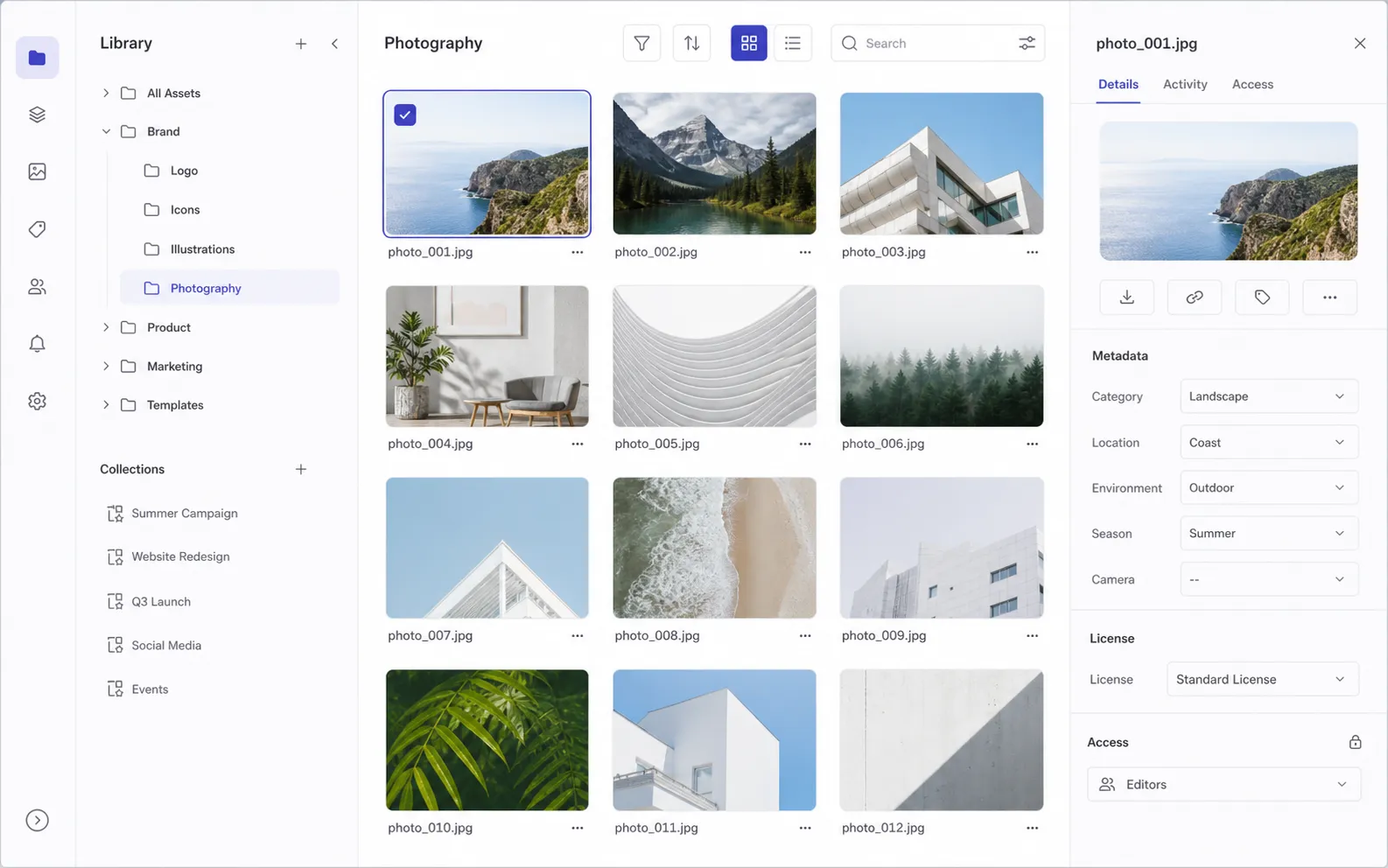
Operate a visual library with the structure, information, and access boundaries needed for day-to-day work.
Separate projects, teams, or libraries into workspaces and collections with their own configuration and analytics scope.
Browse hierarchically, move assets through a filesystem-like structure, and retain detailed asset information.
Start with adaptable templates, combine reusable field sets, or create the custom metadata structure your collection needs.
Segment access across workspaces and collections, record licenses, and choose managed storage or optional customer-controlled storage.
Organization becomes more useful when teams understand their library and can retrieve the right asset without navigating every folder.
Use automated analysis, enrichment, and analytics to see the full picture of your workspace or collection.
Explore visual intelligenceRetrieve assets through semantic, visual, and metadata-based discovery across the managed library.
Explore visual searchStart building a more understandable, searchable, and manageable image library.